Startup procedure
This section describes the steps that the software undertakes during a startup of your voltage source control code (vloop).
Finite state machine
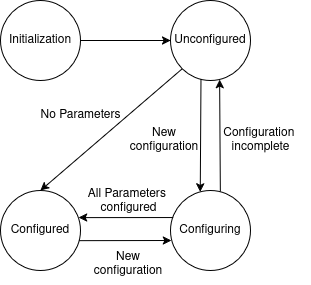
The initialization workflow follows the steps of the finite state machine (FSM), which is defined in the VSlib and is use-case independent, before the control is handed over to user-defined code, which itself may contain a state machine. The states and transition are as shown below:
Initialization
The first stage of the Vloop startup is the Initialization stage. During this stage, the Vloop payload informs the bmboot manager that it has successfully started, and performs all the actions necessary to prepare the shared memory ranges, programmable logic, and communication queues for the Vloop to perform its actions and communicate with the Linux and regulation loop cores.
When the logic of this stage is executed, an object of the user-defined class containing
all Components and Parameters needed to control the hardware is created.
Then, the state transitions to Unconfigured.
Unconfigured
The transition from Initialization state is triggered after the user-defined class is initialized. The entrance to the Unconfigured state triggers creation and upload of the parameter map.
In case there are no Parameters to be configured, the state transitions directly to
Configured state. Otherwise, by default the state transitions
to Configuring.
Configuring
In Configuring state, the methods to receive and process commands to set the Parameters
are invoked. When done, the state automatically transitions away from Configuring to either
Unconfigured, if there are still Parameters that have not been configured, or directly
to Configured if all Parameters have been initialized and all validation checks passed
successfully.
Configured
This is the final state of the VSlib FSM. If this is the first time the FSM enters the Configured
state, the init() method of user-defined class deriving from the RootConverter interface
is called to perform all the actions necessary for the user-class to start up, for example
calling start() methods for all requested interrupts to begin real-time code execution.
Then, the code enters an infinite loop where first the code checks if there is a new configuration
waiting to be processed, and if yes: transitions to Configuring, and if not
it calls the user-defined backgroundTask method containing all the code to be executed in the background
on the user-side.